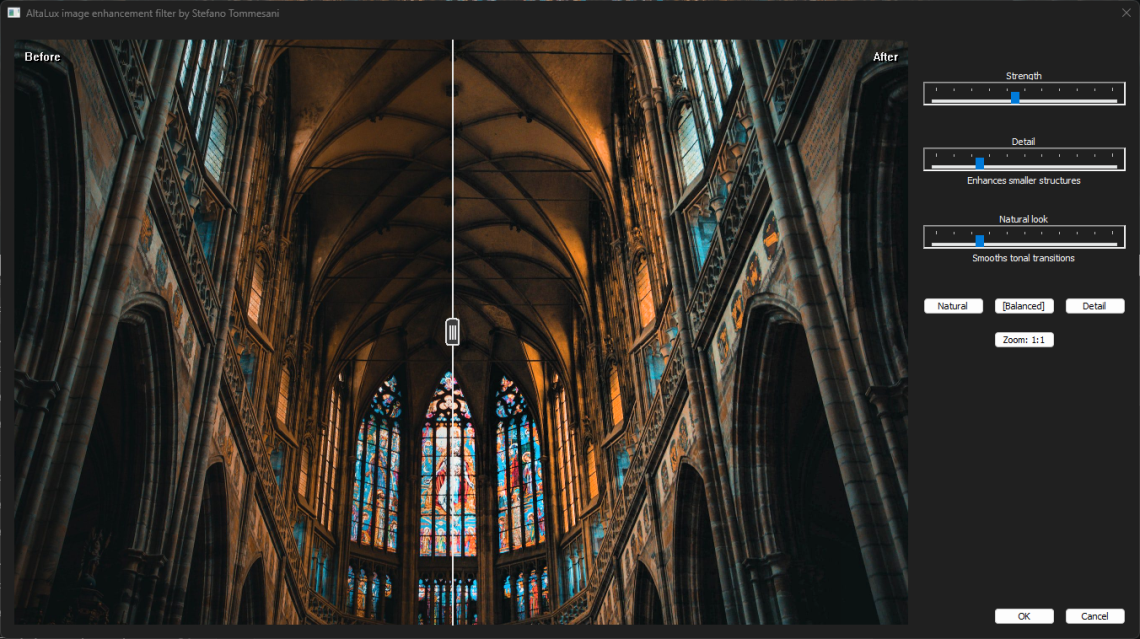
Version 2.0 is a major redesign of AltaLux, the image enhancement plugin for IrfanView. The previous version exposed the CLAHE algorithm directly through technical controls such as Intensity and Scale. That worked, but it asked the user to think like the algorithm.
AltaLux 2.0 changes the model. The plugin now uses a fixed three-layer multiscale pipeline internally and exposes three high-level controls:
- Strength: how much enhancement is applied.
- Detail: how much the result favors fine local structures.
- Natural look: how much the result favors smoother tonal transitions.
The goal is simple: keep the power of CLAHE, but make the result easier to tune.
The main change: multiscale enhancement
The problem
CLAHE is powerful because it enhances local contrast, but a single CLAHE scale is always a compromise. Small tiles reveal texture and fine detail, but they can make an image look busy or noisy. Large tiles look smoother and more natural, but they can miss small shadow details. The old Scale slider exposed that tradeoff directly, so users had to pick one behavior before adjusting intensity.
The fix
AltaLux 2.0 no longer asks the user to choose one tile scale. It runs three fixed CLAHE layers:
Fine layer      16 x 16 regions   small structures and local texture
Balanced layer   8 x 8 regions   main contrast enhancement
Smooth layer     4 x 4 regions   broad tonal transitions
The three layers are blended together. The Detail slider shifts the blend toward the fine layer. The Natural look slider shifts it toward the smooth layer. The balanced layer remains part of the mix so the output does not swing too far in either direction.
Impact: users can now tune the look of the enhancement directly instead of thinking about CLAHE region grids.
User experience improvements
Large before/after preview
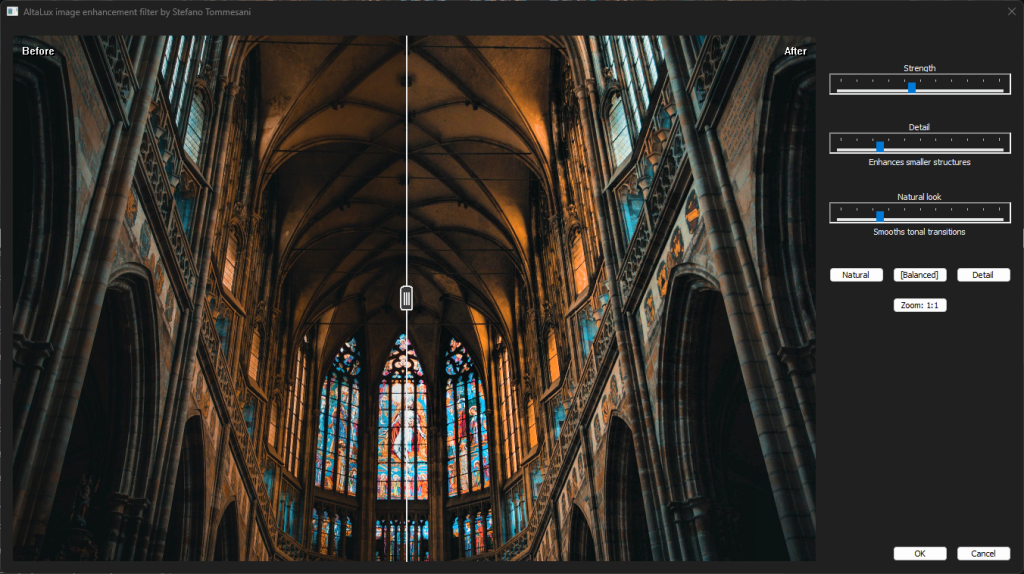
The old preview grid has been replaced with a large comparison preview. The dialog now shows the original and processed image in the same view with a draggable vertical split.
The preview supports:
- Dragging the divider to inspect different parts of the image.
- Double-clicking the divider to recenter it.
- Holding
Spaceto temporarily show the original. - Switching between fit preview and 1:1 crop preview.
This makes tuning faster because the user can judge the actual difference in the same image area, not by looking at separate thumbnails.
Three presets
AltaLux 2.0 includes three presets:
| Preset | Strength | Detail | Natural look |
|---|---|---|---|
| Natural | 35 | 10 | 55 |
| Balanced | 45 | 25 | 25 |
| Detail | 55 | 60 | 10 |
Balanced is the default starting point unless saved settings override it. The presets are intentionally simple. They are not special processing modes; they are named starting points for the same three controls.
Image quality improvements
Better luminance handling
AltaLux 2.0 uses BT.709 luminance coefficients:
Y = 0.2126 R + 0.7152 G + 0.0722 BThis is a better fit for modern still images and HD/4K video-derived frames than the older BT.601-style coefficients used in earlier code.
Correct channel order for Windows DIBs
Windows DIB buffers are BGR/BGRA ordered. The v2 multiscale path routes image data through the BGR filter variants so luminance extraction matches the actual byte order.
Highlight color preservation
AltaLux already moved away from additive color changes in the previous release. Version 2.0 refines that path further by using multiplicative color scaling with a scale cap. The cap prevents one saturated channel from clipping while the others keep rising, which can shift hue in bright highlights.
Impact: enhanced images keep more stable colors, especially in bright or highly saturated areas.
Alpha preservation
RGB32/BGRA images keep their alpha channel unchanged during v2 processing. The unit tests also check that RGB24 and RGB32 produce matching RGB output when the source colors are the same.
Performance work
The new pipeline runs three CLAHE passes, so it naturally has more work to do than the old single-scale path. Version 2.0 adds several optimizations to keep that cost practical:
- SIMD code for multiscale accumulation and final blending.
- Sequential layer processing for smaller images, avoiding unnecessary task and memory overhead.
- Parallel accumulation and blending for images at or above 200K pixels.
- Parallel execution of the three CLAHE layers for images at or above 1M pixels.
- A smaller reciprocal lookup table for color scaling: 1 KiB instead of the old 64 KiB two-dimensional scale table.
- SSE intrinsic implementations for packed YUV luma copy/writeback paths, replacing old 32-bit inline assembly.
The large-image path intentionally trades memory for latency by allocating three full layer buffers and processing the fine, balanced, and smooth layers in parallel.
Developer and test improvements
The v2 logic now lives in a shared AltaLuxCore module. This module contains the UI state, preset logic, blend-weight calculation, preview geometry helpers, layer strength mapping, and multiscale processing path. That separation made it possible to add focused unit tests for the new behavior. The current Microsoft C++ unit test suite contains 20 tests covering:
- Presets and preset tolerance.
- Blend-weight normalization.
- The conservative layer-strength curve.
- Independent
DetailandNatural lookbehavior. - Safe layer region clamping.
- Preview fitting and 1:1 crop geometry.
- Zero-strength no-op behavior.
- RGB32 alpha preservation.
- RGB24/RGB32 consistency.
- Detail and Natural-look sensitivity.
- The large-image parallel-layer path.
This should make future changes safer because the important v2 behavior is no longer only embedded in the dialog code.
Migration guide
For users
No special migration step is required. Replace the old AltaLux.dll with the new one and restart IrfanView.
Existing Intensity settings are used as a fallback when no v2 Strength setting exists. New settings are stored as:
[AltaLux]
Strength=45
Detail=25
NaturalLook=25
Zoom=0
The old Scale control is not part of the v2 user interface.
For batch scripts
There is one important compatibility change. The non-dialog path no longer uses the old (Intensity, Scale) model.
In v2:
param1initializesStrength.Detaildefaults to25.Natural lookdefaults to25.param2is accepted by the IrfanView effect signature but no longer controls CLAHE scale.
Example:
i_view32.exe /effect=(AltaLux,45,0) input.jpgIf you had scripts that depended on the second parameter as tile scale, update them for the v2 behavior.
Use cases
AltaLux 2.0 is useful for:
Photography
- Backlit subjects where shadow detail needs to be recovered.
- Night or indoor photos with local contrast hidden in dark regions.
- Images that need more texture without a full HDR tone-mapping workflow.
Document and archive work
- Scanned documents with uneven lighting.
- Faded historical photos.
- Technical drawings where fine contrast helps readability.
Video and frame analysis
- Low-contrast frames extracted from video.
- Surveillance or inspection frames where visibility matters.
- Scientific or technical imagery where subtle local differences are important.
Full changelog
Added
- Fixed three-layer multiscale CLAHE processing.
Strength,Detail, andNatural lookcontrols.- Large before/after split preview.
- Spacebar hold-to-compare.
- Double-click split recenter.
- Fit and 1:1 preview modes.
- Natural, Balanced, and Detail presets.
- Shared
AltaLuxCoremodule. - Unit tests for the v2 behavior.
Changed
- Replaced the old Intensity/Scale dialog workflow.
- Replaced the preview-variation grid with a direct comparison preview.
- Changed the non-dialog parameter model so
param1controls Strength. - Updated version resources to 2.0.0.0.
- Updated project files to include
AltaLuxCoreand newer MSVC toolsets.
Fixed and improved
- BGR/BGRA-aware luminance routing for Windows DIB data.
- BT.709 luminance coefficients.
- Highlight hue drift reduction through scale capping.
- RGB32 alpha preservation.
- RGB24/RGB32 consistency for matching RGB content.
- Zero-strength no-op behavior.
- Packed YUV luma paths using SSE intrinsics instead of old inline assembly.
Performance
- SIMD multiscale accumulation and final blending.
- Thresholded parallel accumulation/blending.
- Parallel execution of the three CLAHE layers for large images.
- Smaller reciprocal lookup table for color scaling.
Download
Latest release: link
Requirements:
- IrfanView 64 bit for Windows.
- AltaLux plugin DLL.
- Windows version supported by the chosen IrfanView build.
Acknowledgments
Thanks to Karel Zuiderveld for the original CLAHE algorithm, Irfan Skiljan for
IrfanView and its plugin architecture, and the users who keep testing AltaLux on
real images.
License
AltaLux is distributed under the Microsoft Public License (MS-PL).