Open Diagrams → Monte Carlo and press Start. Sundial samples each unfinished leaf's total effort from a Beta-PERT distribution using its optimistic, most likely and pessimistic estimates (lambda 4). Missing bounds default to the most likely estimate. Equal bounds produce fixed effort. Spent effort is subtracted by the ordinary scheduler, completed history remains fixed, and parent completion dates roll up through Epics, Initiatives and the Project.
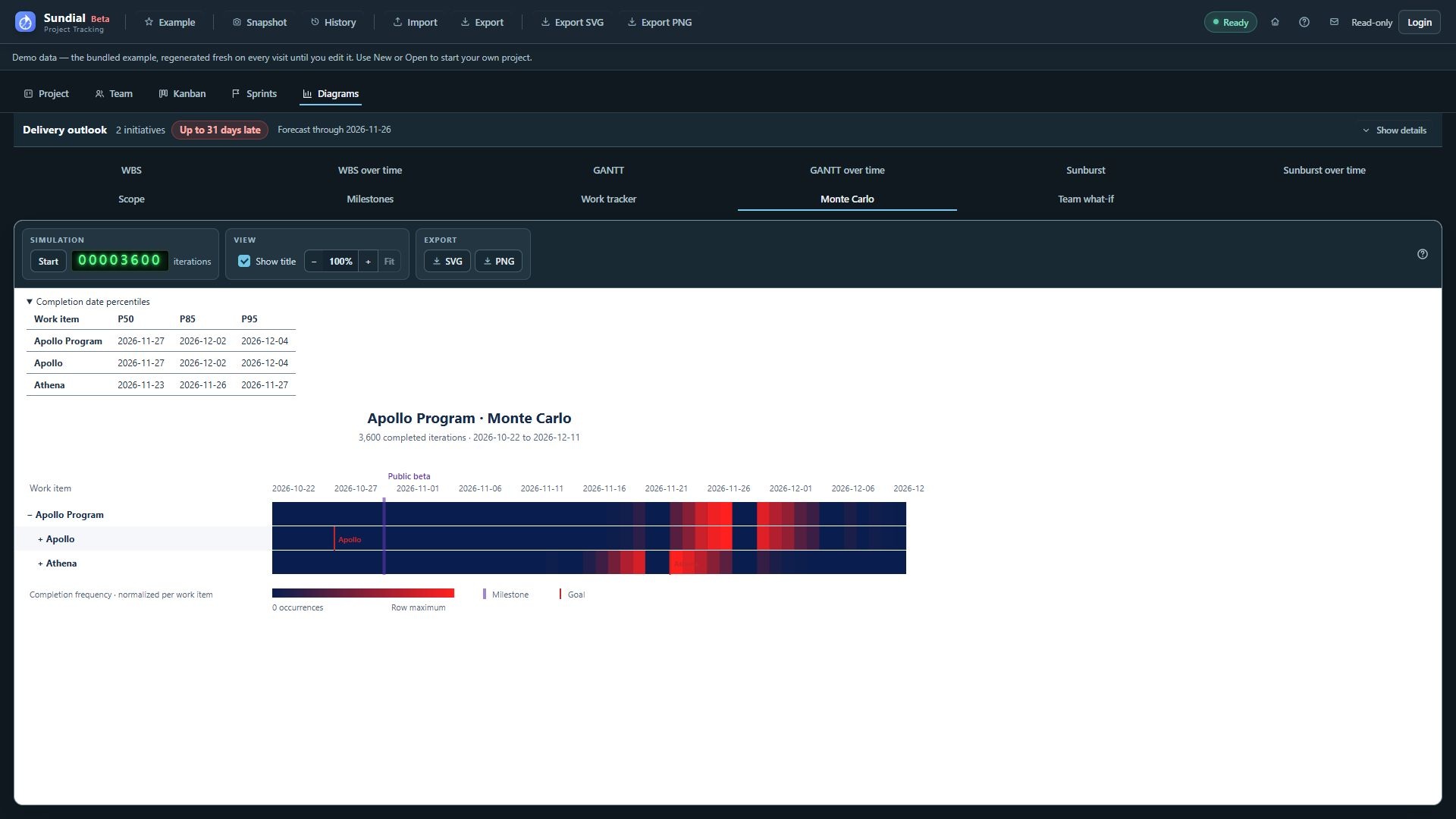
Figure 31. Stopped Monte Carlo run with Project and Initiative distributions and the P50, P85, and P95 table.
The computation runs in a background worker. As soon as the first iteration completes, the diagram and percentile table appear with that single sample. They then refresh together at most once every five seconds. The green calculator-style counter shows completed iterations and refreshes at most once per second after the first result. The counter may therefore be ahead of the displayed diagram; cell percentages and percentiles always use the iteration count printed on that diagram.
The heatmap follows the GANTT hierarchy and its initial root/depth settings. Expand or collapse rows using their disclosure controls. The timeline extends from Now to the latest simulated completion date. Dark blue means no completion on that day; bright red marks the most frequent day within that row. Each row is normalized independently, so colors do not compare raw counts between work items. Hover a day to see the date, occurrence count and percentage of completed iterations. Historical completions before Now remain in the percentile statistics but lie outside the heatmap window.
Violet vertical bars mark milestones; red row ticks mark Goal deadlines, using the GANTT conventions. Inherited deadlines continue through descendant rows, with the label shown only where that deadline begins. Hover a marker to read its name and date. The timeline extends far enough to show future milestones and Goals even when they fall after the latest simulated completion; exports include these markers.
Expand Completion date percentiles to see Project and Initiative P50, P85 and P95 dates. For example, P85 is the earliest date by which at least 85% of completed iterations finished that item. Percentiles use the empirical nearest-rank rule. Iterations without a completion date count toward the denominator; if too few iterations finish the item, the corresponding percentile is unavailable.
Stop finishes and counts the current iteration, then immediately refreshes all results. Leaving the Monte Carlo tab also stops computation after the current iteration. Returning shows the existing results without resuming. Pressing Start again clears them and starts a fresh run.
Each run uses a temporary in-memory copy of the inputs captured at Start, including resolved holidays. Edits do not change an ongoing run. This copy creates no saved Snapshot and adds no entry to History. Monte Carlo results are not saved with the project and disappear on reload or project replacement. Use Export SVG or Export PNG to preserve them; the export includes the heatmap, represented iteration count and the percentile table, even when the table is collapsed on screen.