Use Urgent, High, Normal, or Low to express preference across the project. An item's Inherit option uses its nearest ancestor with an explicit priority, or Normal if none exists. A container's explicit priority guides descendants that inherit. An explicit Normal overrides an inherited Urgent or High.
Set an inherited or explicit priority
- Open a work item from Project, Kanban, Sprints, or a supported diagram.
- Choose a value in Priority, or choose Inherit and review the effective value shown beside it.
- Choose Apply to commit the edit.
- Check the Project Priority column, Kanban cards, or sprint planning lists. A small arrow identifies inherited values.
In Example, Login flow is Urgent and Login page and Session tokens inherit it. Normalization is Low. You can inspect these examples to see how inheritance works.
Order unfinished tasks within a priority
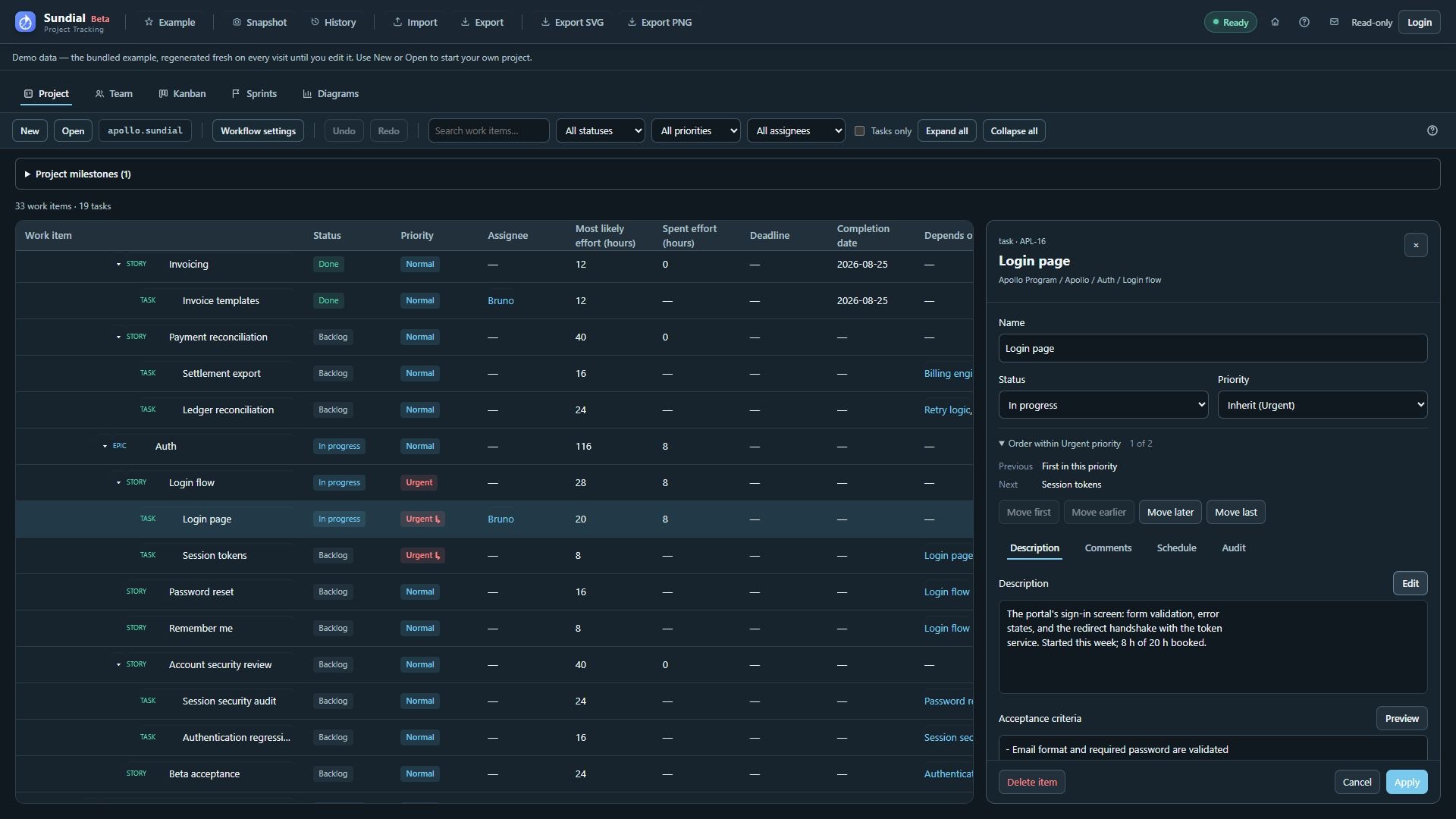
Figure 13. Login page with inherited Urgent priority, ordering controls, and formatted Description preview.
- Open an unfinished actionable leaf and expand Order within … priority.
- Review its position and the preceding and following task names.
- Use Move first, Move earlier, Move later, or Move last to change its preference within that priority.
- Apply the form to commit order, priority, and other draft fields together. Cancel discards them.
- Review the updated forecast and dependencies.
The ordering pool spans eligible unfinished leaf work across the project, even when a board, sprint, or branch filter hides some tasks. Ordering does not rearrange the hierarchy or change sprint membership. Completed and canceled work do not participate in the active ordering pool. A container passes priority to inheriting descendants, but does not pass its manual position to them.
The scheduler considers deadline urgency before priority and manual order. A task must still meet its dependencies, start constraints, calendar, skill, access, and capacity requirements before pickup. Assignments already started continue. An Urgent priority expresses a preference within those constraints.
Applied preferences support Undo/Redo, shared editing, native recovery, and reporting snapshots. Resolve a stale draft before applying. To view preferences while planning a sprint, use its Priority filter and the labels beside work-item names.